Know before your Mac
goes down.
Perf Pulse warns you when an app is running away with memory or your disk is approaching a critical limit, then opens the live local view so you can act before your work disappears.
18.3%
89%
312
47 apps3d 14h
| Name | PID | CPU | Memory | Actions |
|---|---|---|---|---|
| ▶VS Code(23) | — | 14.6% | 4.2 GiB | ExplainStop |
| VS Code Helper (Renderer) | 2341 | 6.1% | 1.8 GiB | Stop |
| VS Code Helper (Plugin) | 2342 | 4.3% | 1.2 GiB | Stop |
| VS Code Helper (GPU) | 2343 | 2.1% | 680 MiB | Stop |
| ▶Google Chrome(31) | — | 8.7% | 3.1 GiB | ExplainStop |
| ▶Docker Desktop(5) | — | 4.1% | 2.1 GiB | ExplainStop |
| node | — | 6.2% | 512 MiB | ExplainStop |
| Spotlight | — | 1.9% | 234 MiB | ExplainStop |
Visual Studio Code editor. Electron-based with multiple helper processes for rendering, plugins, and GPU.
High CPU: Large workspace, many extensions, or TypeScript compilation.
Activity Monitor shows you what is happening.
It does not warn you before it is too late.
A flat process list is not enough when your Mac is minutes away from memory or disk exhaustion.
"Why did my Mac freeze before I could react?"
Activity Monitor doesn’t alert you when one app keeps growing or disk headroom is disappearing.
"Why is my Mac using 14 GiB RAM?"
Activity Monitor doesn't explain. It shows a flat list of PIDs with no grouping or context.
"What can I safely quit?"
No guidance. Just a flat PID list. You're on your own deciding what to kill.
Know before your Mac goes down.
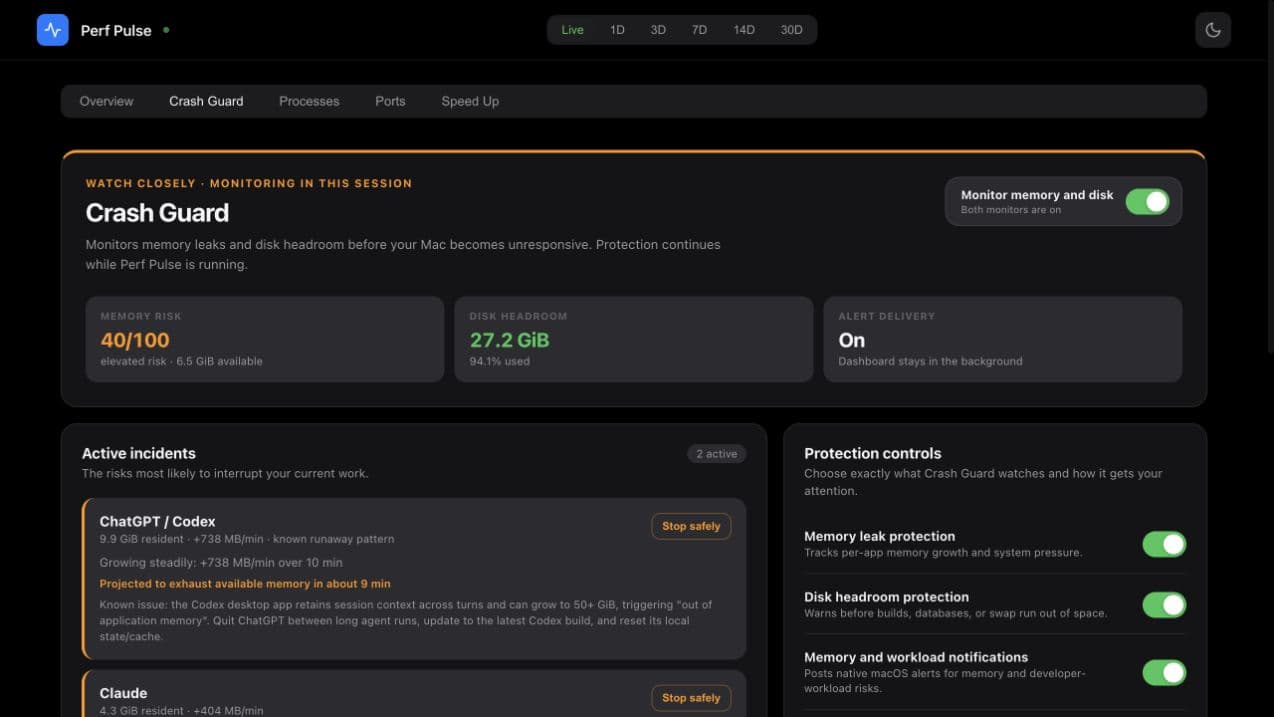
Crash Guard watches runaway app memory and shrinking disk headroom in the background. It warns you early, can open the live local dashboard, and helps you stop the right process safely.
Memory risk
40 / 100
Tracks pressure, swap growth, and per-app leak velocity.
Disk headroom
27.2 GiB
Warns on low space and projects time to a critical threshold.
Alert delivery
Native + live
A notification can bring the exact Crash Guard tab forward.
Always on at login
A per-user launch agent keeps watch after terminal sessions end. No root daemon or macOS system extension.
You stay in control
Stopping a process requires your confirmation and a fresh identity check before Perf Pulse sends a signal.
Storage stays read-only
Crash Guard finds developer storage hotspots and files held open by apps. It never deletes files automatically.
Everything you need.
Nothing you don't.
Built for developers who want real answers, not just raw data.
Performance Score
One number to rule them all. Your Mac's health as a 0-100 score — instantly understand if things are good, or need attention. Component breakdown shows exactly where to focus.
Meeting Mode
The panic button for video calls. One click pauses Docker, Spotlight, Time Machine, and other resource hogs. Your Zoom calls will thank you. Auto-restores after your meeting.
Pauses background processes for smoother video calls
Battery Optimizer
See exactly what's draining your battery. Get actionable recommendations and one-click optimization. Users report 30%+ battery life extension on typical workdays.
AI Pattern Detection
Your Mac learns your patterns over 2 weeks. Predicts slowdowns before they happen, identifies memory leaks, and finds your optimal work windows. Like having a performance analyst on staff.
Performance drops by ~18% between 2:00 PM - 4:00 PM when Docker + Chrome + Slack peak together
Slack grows 200MB+ over 8 hours. Restart recommended daily.
Best time for heavy tasks: 6:00 AM - 9:00 AM when background load is minimal
Port Mapper
Instantly see which process owns which port. No more piping lsof through grep.
| PORT | PID | PROCESS | LABEL |
|---|---|---|---|
| 3000 | 12847 | node | Next.js Dev |
| 5432 | 9912 | postgres | PostgreSQL |
| 6379 | 10234 | redis-server | Redis |
| 8080 | 903 | docker-proxy | Docker |
| 8888 | 14201 | jupyter-lab | Jupyter |
AI Process Explainer
"What is com.apple.bird?" Click any process for instant, plain English answers — safety rating, quit consequences, and actions. 75+ built-in explanations, with Claude Code deep-dives for Pro users.
The macOS display server. Manages all on-screen rendering — windows, animations, transparency, and GPU compositing.
High CPU: Usually means heavy UI rendering, lots of windows, or external display scaling.
Inline Process Descriptions
Every process shows a one-line explanation right in the table — no clicking required. Descriptions load automatically, persist across sessions, and cover macOS daemons, dev tools, databases, and popular apps.
JavaScript runtime built on V8
Spotlight search indexing daemon
macOS display compositor
iCloud sync daemon
Learned Insights
Your Mac builds a performance profile over time. See time-of-day slowdown patterns, frequent bottleneck processes, and memory trends — surfaced right in the Speed Up tab with confidence scores.
Your Mac typically slows down around 3:00 PM
Chrome is your top CPU consumer during slowdowns
Memory usage climbs ~1.2 GB between morning and evening
Speed-Up Recommendations
One-click analysis finds exactly what’s slowing you down. Know what to quit and how much you’ll save.
Chrome using 3.1 GiB with 47 processes
Close unused tabs to save ~1.8 GiB
Memory pressure: 89% used
Quit Slack and Docker Desktop to free 3.5 GiB
4 idle apps running > 2 hours
Quitting saves 890 MiB memory, 2.3% CPU
Potential savings: 6.2 GiB memory, 14.8% CPU
Process Groups
See the real cost of each app. Not 47 separate Chrome PIDs — one entry showing total impact. Click to explore details and take action.
Quick Actions
Copy a command or request a graceful stop from the dashboard. Every in-app action requires confirmation and a fresh PID, name, and start-time identity check.
Web browser. Each tab runs as a separate renderer process. GPU and plugin helpers add overhead.
Historical Performance Tracking
Go beyond live monitoring. See 1-day to 30-day retrospectives with per-process CPU and memory charts, ranked app leaderboards, and detailed drill-downs. Find out which apps have been quietly draining your Mac.
Terminal TUI
Live terminal monitor with perf-pulse top. Real-time refresh every 2 seconds. Press q to quit.
Perf Pulse v1.1.0              CPU: 18.3%  MEM: 14.2/16.0 GiB (89%)
Processes: 312                 Uptime: 3d 14h 22m

  NAME                       PID    CPU%    MEM        STATUS
  VS Code Helper            2341   12.4%   2.8 GiB    Running
  Google Chrome             1284    8.7%   3.1 GiB    Running
  node                     12847    6.2%   512 MiB    Running
  com.docker.vmnetd          891    4.1%   2.1 GiB    Running
  WindowServer               187    3.8%   890 MiB    Running

  Press q to quit · Refreshing every 2s
CLI Power
Pipe system data to Claude Code or Codex. JSON, CSV, or text output for AI-powered analysis.
$ perf-pulse analyze --format json | claude "what's using the most memory?"

Based on the system snapshot, here are the top memory consumers:

1. Google Chrome — 3.1 GiB (47 processes)
   → Recommendation: Close unused tabs
2. VS Code — 2.8 GiB (23 processes)
   → Normal for large workspaces
3. Docker Desktop — 2.1 GiB (12 processes)
   → Consider reducing VM memory allocation
Everything included.
One price. Forever.
Here's what you get with Perf Pulse Pro.
Instant delivery • Works on macOS 12+ • 30-day money-back guarantee
“Saved me 2 hours of debugging a memory leak.”
Sarah K.
Senior Engineer, Stripe
“Meeting Mode is a game changer for Zoom calls.”
Mike T.
Engineering Manager
“Finally understand what mds_stores is doing!”
Alex R.
iOS Developer
Up and running in
three steps.
Install once, choose your protection level, and stay in control.
Install in 30 seconds
One command. No account creation, no cloud sync, no setup wizard.
Turn on always-on protection
Crash Guard starts for your user at login. No root daemon or system extension.
Get warned. Review. Stop safely.
A native alert can open the exact live dashboard. You confirm every identity-checked stop.
Simple, transparent pricing
One-time payment or subscribe. Cancel anytime.
Perf Pulse Pro
For individual developers
Founder's Edition — Save 63%
Get Perf PulseOne-time payment. Lifetime license. 30-day money-back guarantee.
- Always-on Crash Guard for memory and disk
- Performance Score (0-100) with insights
- Meeting Mode for video calls
- Battery Optimizer (30%+ extension)
- AI Pattern Detection
- Developer Profiles (React, iOS, etc.)
- Startup Manager
- Auto-Scheduling & Webhook Alerts
- Before/After Reports
- Live process monitor with grouping
- Port mapper for developers
- AI process explainer
- CLI analysis engine
- Lifetime updates
- 30-day money-back guarantee
Perf Pulse Enterprise
For teams & organizations
One-time payment. Lifetime license. 30-day money-back guarantee.
- Everything in Pro
- Team dashboard (coming soon)
- Fleet monitoring & alerts
- Usage reports for IT
- Priority support (24hr response)
- Custom profile creation
- Onboarding call
Your resource data stays on your Mac.
Perf Pulse monitors locally with no analytics or tracking. Network access is limited to license validation and the alerts you choose to configure.
Local by Default
Resource monitoring and analysis stay on your Mac. Network use is limited to license validation and alerts you explicitly configure.
User-Controlled Actions
Monitoring is read-only by default and storage scans never delete files. Process stopping is explicit, confirmation-gated, and identity-checked.
Audited Code
Built in Rust with memory safety guarantees. XSS-protected dashboard. No unsafe code. Stripped binary — nothing hidden.
Verified Delivery
Installed via Homebrew with SHA-256 checksum verification. Signed releases. Automatic integrity checks on every update.
Security measures
- ✓Dashboard bound to localhost only — never exposed to the network
- ✓Process actions require confirmation and a fresh identity check
- ✓Storage diagnostics are read-only and never delete files
- ✓CORS restricted to same-origin requests
- ✓HTML output sanitized to prevent XSS injection
- ✓License file stored with owner-only permissions (600)
- ✓HTTPS-only license validation with pinned endpoint
- ✓Stripe webhook signature verification on every payment event
- ✓Security headers: HSTS, CSP, X-Frame-Options, referrer policy
Frequently asked questions
Everything you need to know about Perf Pulse Pro
Still have questions? Contact support